功能 · 自 FireAI 0.1.0 起可用
The menu bar widget
Check your traffic and flip the switches that matter without opening FireAI.
在 FireAI 中的位置: macOS menu bar
此页面暂时只有英文版。
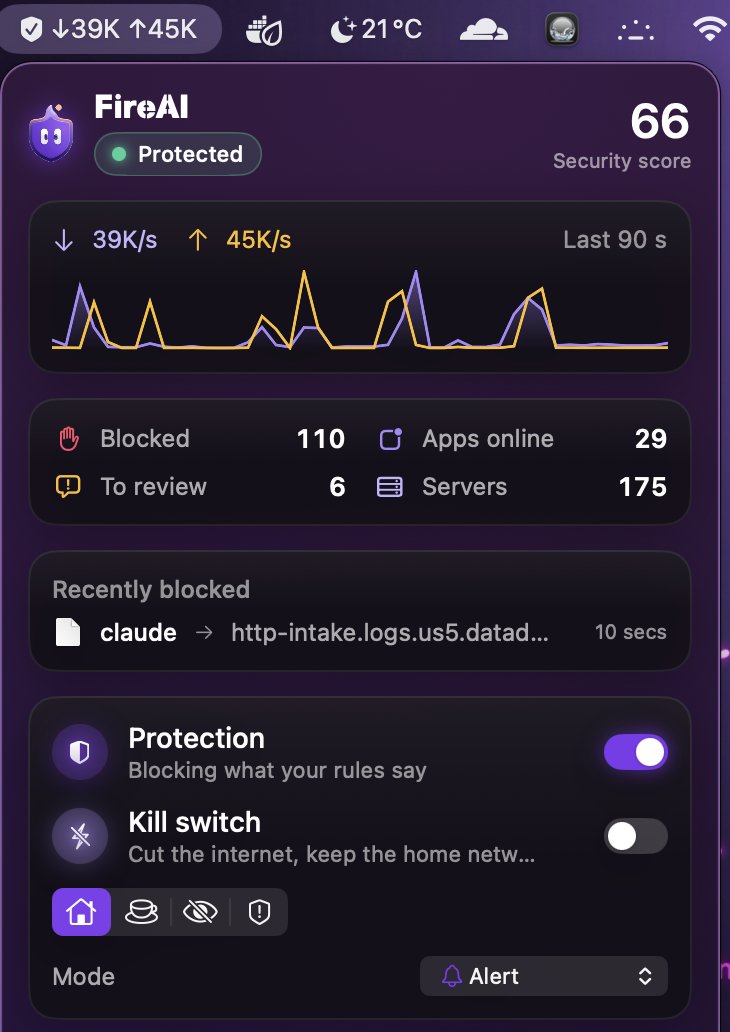
- A live upload/download rate and a sparkline chart of the last 90 seconds.
- Blocked, Apps online, To review and Servers, at a glance.
- Recently blocked: up to four recent blocks, with the app, the destination and when.
- Quick switches: Protection on or off, the kill switch, a “Where are you?” security-mode picker, and the operating mode.
- An Ask FireAI field, so you can type an order without opening the main window.
Open FireAI opens the main window; Quit closes the app entirely. Settings › Menu bar can add the upload/download speed next to the icon. The kill switch is one of the quick switches available here.
继续阅读
在您的 Mac 上试用
免费试用全部功能 17 天,无需绑定银行卡。
30 天退款保证。