Функция · Доступно с FireAI 0.1.0
The menu bar widget
Check your traffic and flip the switches that matter without opening FireAI.
Где в FireAI: macOS menu bar
Пока эта страница на английском.
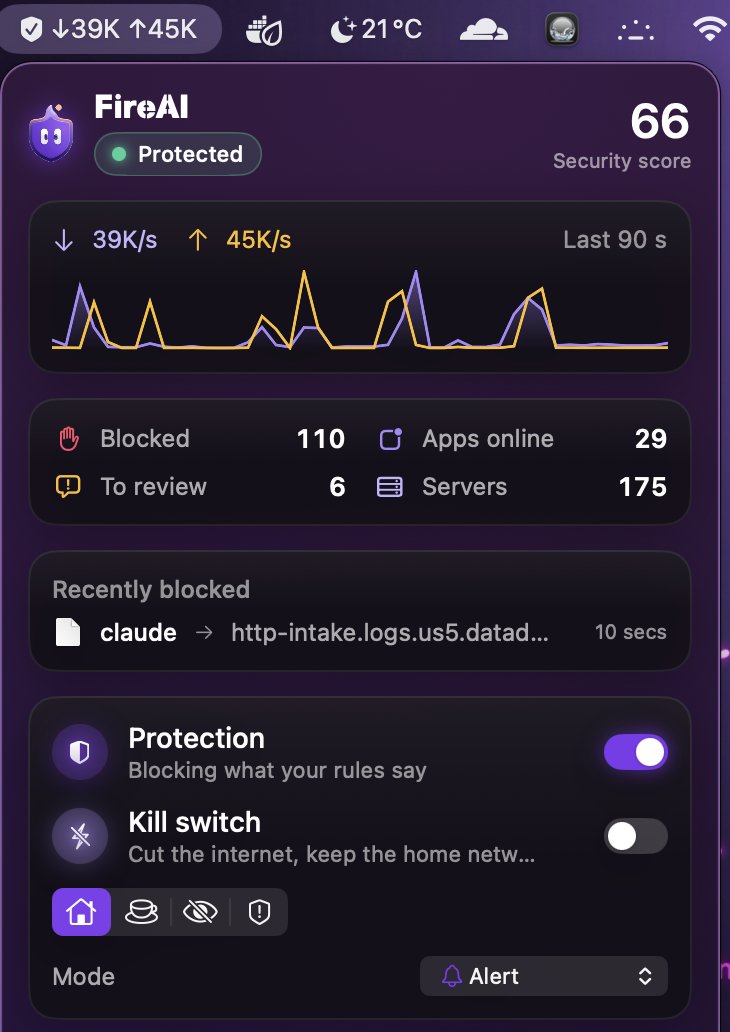
- A live upload/download rate and a sparkline chart of the last 90 seconds.
- Blocked, Apps online, To review and Servers, at a glance.
- Recently blocked: up to four recent blocks, with the app, the destination and when.
- Quick switches: Protection on or off, the kill switch, a “Where are you?” security-mode picker, and the operating mode.
- An Ask FireAI field, so you can type an order without opening the main window.
Open FireAI opens the main window; Quit closes the app entirely. Settings › Menu bar can add the upload/download speed next to the icon. The kill switch is one of the quick switches available here.
Читать дальше
Попробуйте на своём Mac
Все функции бесплатно на 17 дней, без банковской карты.
Возврат денег в течение 30 дней.