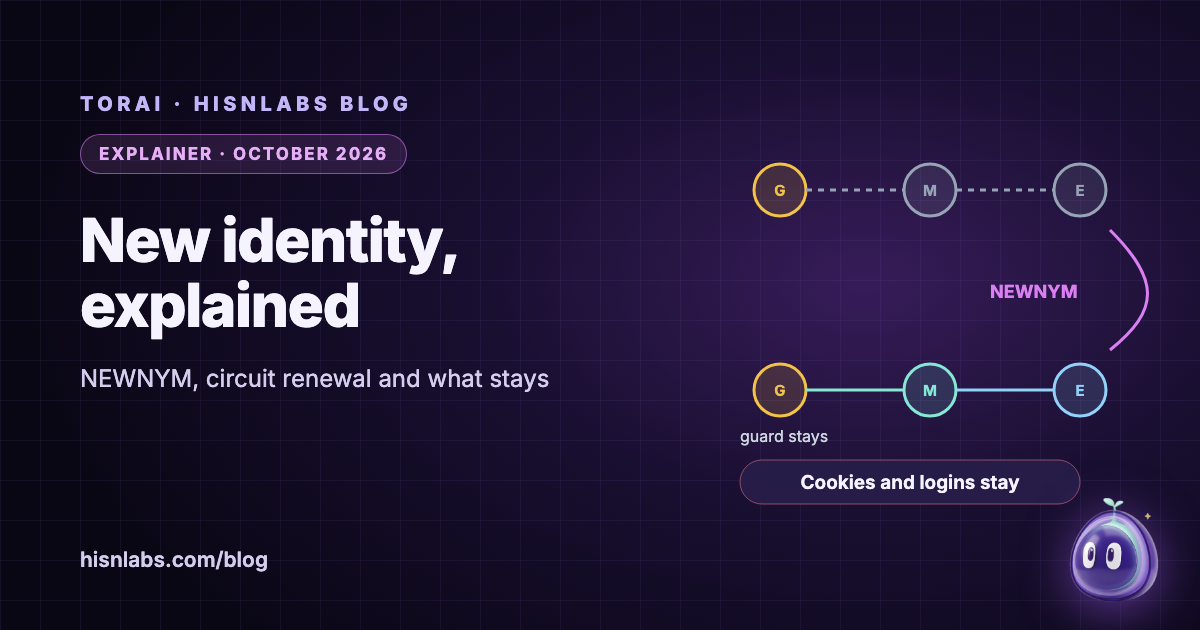
Tor changes circuits on its own, and users can ask for fresh ones with a “New Identity” button. This note sets out, from the tor manual, the Tor control specification, tor’s source code and the Tor Browser documentation, what each kind of renewal changes: the ten-minute limit on reusing a circuit, the control signal NEWNYM, Tor Browser’s New Identity and its New Tor Circuit for this Site. The central point is that renewal changes the middle and exit relays that new connections use, and so the address a server sees. It does not change the entry guard, and it does not erase what an application or a website already knows about its user.
Background
A Tor circuit is a path through three relays: a guard, a middle and an exit. The Tor Project’s support pages describe the guard as “a fast and stable relay that remains the first one in your circuit for 2-3 months in order to protect against a known anonymity-breaking attack”, and add that “the rest of your circuit changes with every new website you visit” [6]. Each application connection, which tor calls a stream, rides on one circuit. Which streams may share a circuit is decided by isolation rules; the default IsolateSOCKSAuth rule says “Don’t share circuits with streams for which different SOCKS authentication was provided” [1]. Software that wants separate circuits for separate activities, as Tor Browser does per site, gives each activity its own SOCKS credentials.
Findings
Circuits age out after ten minutes, for new connections only
The tor manual’s MaxCircuitDirtiness option reads: “Feel free to reuse a circuit that was first used at most NUM seconds ago, but never attach a new stream to a circuit that is too old.” Its default is “10 minutes” [1]. The rule is about new streams. A connection already open on a circuit is not moved when that circuit passes ten minutes, so on this reading of the manual a long-lived connection, such as a mail client that keeps its session open or a chat app’s socket, can leave through the same exit for much longer than ten minutes [1].
NEWNYM: clean circuits for new requests, at most every ten seconds
The control specification defines the signal a controller sends for a new identity: “NEWNYM -- Switch to clean circuits, so new application requests don't share any circuits with old ones. Also clears the client-side DNS cache. (Tor MAY rate-limit its response to this signal.)” [2]. In tor’s source, the function that carries it out is introduced as “Honor a NEWNYM request: make future requests unlinkable to past requests”; it marks the circuits already used as unusable for new streams and clears tor’s temporary address mappings and onion service client state [3]. The rate limit is a constant, MAX_SIGNEWNYM_RATE, set to 10 under the comment “How often will we honor SIGNEWNYM requests?”; a request inside that window is not refused but delayed, and tor logs that it is “Rate limiting NEWNYM request” [3]. Nothing in the specification or in that function closes connections that are already open: they finish on their old circuits.
Tor Browser’s New Identity clears the browser, not only the circuits
Tor Browser’s manual says its New Identity option “will close all your open tabs and windows, clear all private information such as cookies and browsing history, and use new Tor circuits for all connections”, and that “Tor Browser will warn you that all activity and downloads will be stopped” [4]. The Tor Browser design document, a draft dated 15 June 2018, states the goal plainly: “All linkable identifiers and browser state MUST be cleared by this feature.” It lists what is cleared, among them cookies, DOM storage, caches, HTTP authentication and site permissions, and only then does the browser “close all remaining HTTP Keep-Alive connections and then send the NEWNYM signal to the Tor control port” [5]. The order shows the reasoning: fresh circuits alone would leave a cookie that links the old session to the new one.
New Tor Circuit for this Site changes the route, not the identity
The second option is meant for a different problem: it “is useful if the exit relay you are using is unable to connect to the website you require, or is not loading it properly”. It reloads the current tab over a new circuit, and the manual is explicit about its limits: “This option does not clear any private information or unlink your activity, nor does it affect your current connections to other websites” [4]. It works because Tor Browser already keeps sites apart: the design requires that “Tor circuits and HTTP connections from a third party in one URL bar origin MUST NOT be reused for that same third party in another URL bar origin”, which it achieves by setting “the SOCKS username and password for each request” [5].
The guard stays, by design
None of these mechanisms picks a new entry guard, and that is deliberate. The manual explains the guard rule: “constantly changing servers increases the odds that an adversary who owns some servers will observe a fraction of your paths” [1]. A Tor Project post of 16 October 2013 sets out the predecessor attack: “if Alice (the user) instead chose new relays for each circuit, eventually an attacker who runs a few relays would be her first and last hop. With entry guards, the risk of end-to-end correlation for any given circuit is the same, but the cumulative risk for all her circuits over time is capped” [7]. The exit is not protected in the same way. Summarising a 2013 study, the same post notes that “the user's traffic passes over pretty much all the exit relays (which makes sense since Tor doesn't use an “exit guard” design)” [7]. Each renewal is a new draw of middle and exit.
| Mechanism | New middle and exit | Connections already open | Entry guard | Cookies, logins, app data | Source |
|---|---|---|---|---|---|
| MaxCircuitDirtiness (default 10 minutes) | For new streams, once the circuit is too old | Stay on their circuit | Unchanged | Unchanged | tor manual |
| SIGNAL NEWNYM | For new requests, at once or after up to 10 s | Not closed by tor | Unchanged | Unchanged; tor’s DNS cache is cleared | Control spec, tor source |
| Tor Browser: New Identity | For all connections | Tabs closed, downloads stopped | Unchanged | Cleared inside Tor Browser | Tor Browser manual and design |
| Tor Browser: New Tor Circuit for this Site | For the current site | Other sites unaffected | Unchanged | Not cleared | Tor Browser manual |
Implications for Mac users
Renewal answers one question: can a server link two sessions by the exit address alone? It does not answer whether the server can link them by anything else. An app that stays signed in sends its account with every request, so a mail, chat or AI app that keeps its session is linked across renewals by that session, whatever the exit. Tor Browser pairs NEWNYM with a full clearing of browser state for exactly this reason [5]. Ordinary apps and browsers routed through Tor have no such step: they keep their cookies, tokens and caches, and a browser other than Tor Browser keeps its fingerprint.
Renewal also has costs. A tool that closes open connections, as Tor Browser does when it closes every tab, stops downloads and calls in progress [4]; a tool that does not close them leaves those connections on the old exit, as tor itself does [2]. Each new circuit has to be built before traffic flows, and an account may see the user appear from another country; Tor Browser’s manual warns that “some websites, such as banks or email providers, might interpret this as a sign that your account has been hacked or compromised, and lock you out” [4]. Frequent renewal does not touch the guard, so it adds no protection at the entry side, while it spreads the user’s traffic over more exits over time [7].
Recommendations
- Use a new identity when what follows should not be linkable to what came before by exit address, and sign out of the accounts involved first: a renewal with the same account signed in is linked by the account.
- When a single site fails to load, change that site’s circuit (in Tor Browser, New Tor Circuit for this Site) rather than renewing everything.
- Finish or pause downloads and calls before renewing; expect them to break if the tool closes open connections.
- Do not renew in a tight loop. tor delays NEWNYM requests that come within 10 seconds of the last, and each renewal draws new middles and exits while the guard stays.
- For web browsing that must not be linked across sessions, use Tor Browser, whose New Identity also clears cookies, storage and caches.
- Expect accounts to see a new location after a renewal, and keep the site’s recovery details at hand.
Relevance to TorAi
TorAi is a HisnLabs app for macOS 15 or later; version 0.1.1 is available. It sends the apps you choose through Tor, each on its own circuit, by giving each app its own SOCKS credentials, the isolation rule described above. Its page describes New identity as “Fresh circuits for everything, or only for one app, in one click.” TorAi’s New Identity sends SIGNAL NEWNYM and then closes every connection it carries over Tor, so routed apps reconnect on new circuits instead of keeping the old exit; connections that go direct stay open. The button follows tor’s rate limit and says so in the app: “Tor allows a new identity at most once every 10 seconds, so the button waits between uses.” An optional setting, A circuit per site, off by default, also keeps the sites inside one app on separate circuits; the app notes that it “means more circuits to build when you open many sites.”
Auto-renew identity, off by default, runs the same New Identity every 10, 30 or 60 minutes, or at a custom interval from 5 to 240 minutes, and the setting states its cost: “Open downloads and calls through Tor are cut each time.” Each renewal also clears the relay history kept by TorAi’s optional Live traffic feature. At the Safest security level TorAi gets a new identity on wake from sleep and when the network changes, and the Safer and Safest levels renew circuits at least every 10 minutes.
What TorAi does not do: it does not clear any app’s cookies, logins, caches or local data, and it does not change Tor’s entry guard, so it cannot make a signed-in app unlinkable across renewals. Quitting and reopening routed apps as part of New Identity is planned, not part of version 0.1.1. For web browsing, Tor Browser’s New Identity remains the tool that clears browser state, and TorAi leaves Tor Browser on its own Tor by default. Details are on the TorAi page.
Limitations
This note describes tor as documented in its manual and source on the main branch as read on 8 October 2026; defaults and the rate limit may differ in other tor versions. The Tor Browser design document is a draft dated 15 June 2018, and the browser’s implementation may have changed since; the manual pages cited are current. That frequent renewal spreads traffic over more exits is an inference from the cited research and tor’s design, not a measurement made for this note, and no claim is made about how much it changes any particular user’s risk. TorAi’s behaviour is described from its release notes, its app text and HisnLabs’s own tests, not from an independent audit; HisnLabs’s decision log records Auto-renew’s schedule as tested with simulated clocks, and its behaviour after a real sleep as not yet verified at the time of writing. HisnLabs makes TorAi, which readers should weigh. Further reading: the FireAI University lesson how Tor works and what it protects, and the posts what Tor hides and what it does not and per-app Tor routing on macOS.
How FireAI and HisnLabs fit in
FireAI does not route traffic through Tor and does not renew circuits. It shows which app on your Mac opens which connection, and lets you block it, which helps to see which apps hold long connections open before you decide what to renew.
FireAI is HisnLabs’ own product: an on-device AI firewall for Mac. It shows every connection your apps make, in plain language, and lets you decide what leaves your Mac — its AI runs locally, so your traffic is never sent to us or anyone else. HisnLabs’ security research team is the group that keeps that decision-making accurate: cataloguing which domains are ordinary telemetry versus a real product, tracking the country and network behind a connection, and training the on-device model (its FireAI Pilot feature) on real traffic patterns, all without any of it leaving your Mac.
You can read the technical decisions behind it, or try FireAI for 17 days, at FireAI, by HisnLabs.