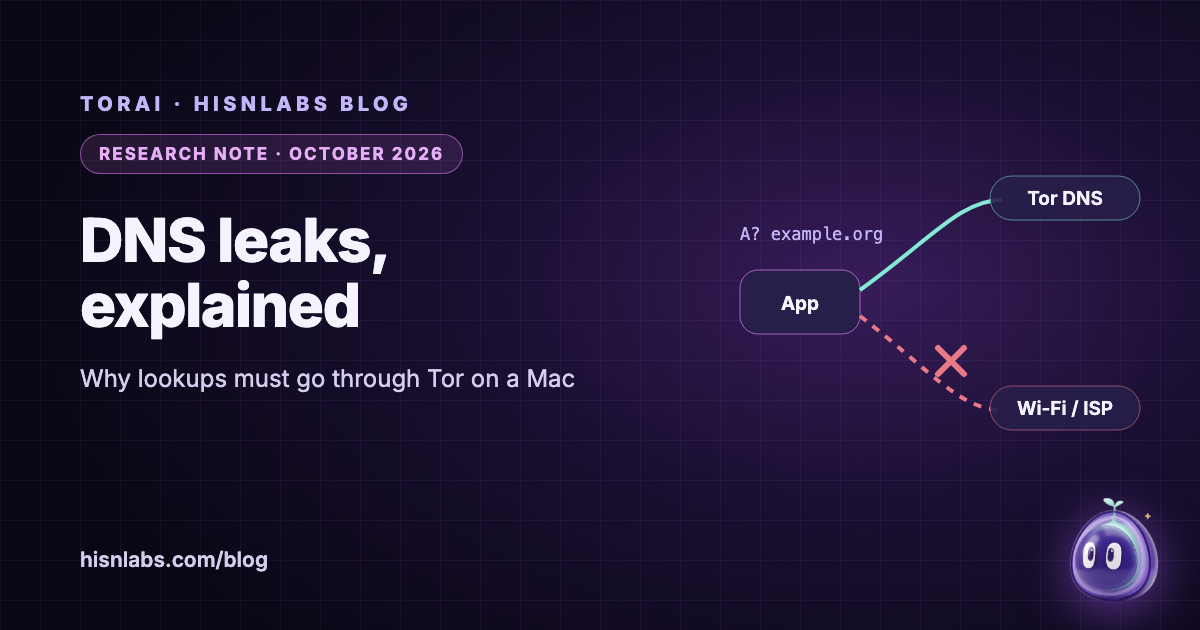
A DNS leak occurs when an application’s traffic is sent through a tunnel, such as Tor or a VPN, while the name lookups that precede that traffic are still answered by the local network’s resolver. This note sets out, from IETF documents, peer-reviewed measurements, the tor manual and Apple’s own open-source code, why a leaked lookup matters even when every connection that follows is protected, why the macOS resolver makes per-app routing harder than it looks, and how a reader can check for a leak. The central point is that a lookup is not metadata about the traffic; it is a statement of where the traffic is going, made before the traffic starts.
Background
Before an application can connect to a named service, the name has to be turned into an address. On a typical network the question goes, unencrypted, to a recursive resolver chosen by the network, usually the one announced by the router or the internet access provider. The IETF’s review of DNS privacy, RFC 9076, published in July 2021, describes the stakes plainly: “A single transaction reveals both the originator of the query and the query contents; this potentially leaks sensitive information about a specific user” [1]. It also notes that “At the time of writing, almost all this DNS traffic is currently sent unencrypted” [1]. A tunnel that carries the connection but not the lookup therefore leaves the most revealing part of the exchange outside it.
Findings
The resolver learns the name and who asked
RFC 9076 singles out the recursive resolver as the party with the widest view: “Recursive resolvers see all the traffic since there is typically no caching before them. To summarize: your recursive resolver knows a lot about you. The resolver of a large IAP, or a large public resolver, can collect data from many users” [1]. Anyone on the path between the device and an unencrypted resolver, such as the operator of a public Wi-Fi network, sees the same questions. Encrypting the lookup to a public resolver removes the local observer but not the resolver itself, which still receives every name.
Tunnels leak when DNS takes another path
Leaks are a documented failure of commercial tunnels, not a theoretical one. Perta, Barbera, Tyson, Haddadi and Mei analysed “14 of the most popular” commercial VPN services and found that “the majority of VPN services suffer from IPv6 traffic leakage”; they also developed “more sophisticated DNS hijacking attacks that allow all traffic to be transparently captured” (PoPETs 2015) [3]. The common mechanism is that name resolution is configured separately from the tunnel, so a tunnel can be up while the resolver in use is still the network’s.
With Tor, a leaked lookup also helps correlation
For Tor users the cost of a leak is higher than the disclosure of one name. Greschbach, Pulls, Roberts, Winter and Feamster showed that DNS traffic gives an observer further opportunities to link the two ends of a Tor connection: their “DefecTor” attacks combine DNS with traffic analysis, and they report that “an adversary who can mount a DefecTor attack can often determine the website that a Tor user is visiting with perfect precision, particularly for less popular websites” [2]. In their measurements, Google’s resolver observed almost 40 per cent of all DNS requests leaving the Tor network through exits [2]. Their study concerns lookups made by exit relays; a lookup made on the user’s own network gives the same information to an observer who is closer still.
Whether the name reaches tor depends on how the app asks
tor accepts names in two ways. An application that speaks SOCKS can hand tor the host name, which the exit relay then resolves; one that resolves the name first and hands tor only an address has already made the lookup outside Tor. The tor manual calls the second form unsafe: SafeSocks “will reject application connections that use unsafe variants of the socks protocol — ones that only provide an IP address, meaning the application is doing a DNS resolve first”, and TestSocks logs each request’s variant, which “helps to determine whether an application using Tor is possibly leaking DNS requests” [5]. tor can also answer lookups itself on a DNSPort, which “only handles A, AAAA, and PTR requests” [5]. The Tor Project’s general warning applies: “Tor only protects applications that are properly configured to send their Internet traffic through Tor” [6].
On macOS, apps ask one shared resolver
Most Mac applications do not send DNS packets themselves. Apple’s mDNSResponder README states that “mDNSResponder is used on macOS as the system resolver” [7]. The lookup therefore leaves the Mac from a system daemon, not from the application that wanted the name, and a tool that routes one application’s connections does not see that application’s lookups unless it handles DNS as well. Apple provides a separate extension point for this, NEDNSProxyProvider: “A DNS proxy allows your app to intercept all DNS traffic generated on a device”, and each flow it receives “corresponds to a socket opened by an app to UDP port 53 or TCP port 53” [9].
.onion names must never reach the ordinary DNS
RFC 7686 reserves .onion and states that applications without Tor support “SHOULD generate an error upon the use of .onion and SHOULD NOT perform a DNS lookup”, while caching servers “MUST generate NXDOMAIN for all such queries” [4]. Its security section gives the reason: “A legacy client may inadvertently attempt to resolve a .onion name through the DNS. This causes a disclosure that the client is attempting to use Tor to reach a specific service” [4]. macOS enforces part of this itself. In Apple’s configd source, the function processOnionResolver looks for a configured resolver whose domain is exactly “onion”; when there is none, the code’s own comment reads “We do not have any such resolver. Add a system-wide “drop” policy for this domain” [8]. On a stock Mac, a .onion lookup is dropped before it reaches the network, which protects the name but also means no application can resolve it.
| Setup | Who answers the lookup | Who learns the name | Source |
|---|---|---|---|
| No tunnel | The network’s resolver | The resolver and anyone on the path to it | RFC 9076 |
| Tunnel, DNS configured outside it | The network’s resolver | The same, while the traffic itself is tunnelled | Perta et al., PoPETs 2015 |
| SOCKS app that sends the host name | An exit relay’s resolver | The exit and its resolver, not the local network | tor manual |
| SOCKS app that resolves first | The network’s resolver | The local resolver; tor sees only an address | tor manual (SafeSocks) |
| .onion in software without Tor | Nobody, if the software follows RFC 7686 | If it leaks: the resolver, which learns the service sought | RFC 7686 |
| .onion on a stock Mac | Dropped by a system-wide policy | Nobody, and the name cannot be resolved | Apple configd source |
Implications for Mac users
Three consequences follow for anyone who routes some applications through Tor on a Mac. First, routing an application’s connections is not enough: unless its lookups are handled too, the shared system resolver tells the local network which names that application is about to reach. Second, a leaked lookup is worse than a leaked connection in one respect, because it happens first and is often unencrypted, so it reaches observers who would see nothing of the encrypted traffic that follows. Third, .onion names need the opposite treatment from ordinary names: they must reach tor and nothing else, and on macOS they reach nothing at all unless a resolver for the onion domain is configured.
Recommendations
- List the resolvers macOS is using with
scutil --dns, before and after turning on a tunnel, and note which domains each one serves. - Watch DNS on the active interface while you use a routed app, with
sudo tcpdump -n -i en0 port 53(replace en0 with your interface). The names that app looks up should not appear; a .onion name should never appear. - For an app you configure as a SOCKS client, make sure it sends host names to tor rather than resolving them first; tor’s TestSocks option logs which variant each request used.
- Remember that encrypted DNS to a public resolver hides your lookups from the local network, not from that resolver.
- Repeat the check after changing network, updating macOS or updating the app: resolver configuration changes with each of them.
- Do not type .onion names into software that is not routed through Tor; open onion services in Tor Browser or in an app whose lookups you know reach tor.
scutil --dns
sudo tcpdump -n -i en0 port 53Relevance to TorAi
TorAi is a HisnLabs app for macOS that routes the apps a user chooses through Tor, each on its own circuit; version 0.1.1 is the current release. Its development builds had exactly the gap described above: in Selected apps mode, the system resolver was not a routed app, so lookups made for routed apps, including .onion names, went to the network’s resolver, although the connections themselves went through Tor. Since version 0.1.0, TorAi includes a DNS proxy, built on NEDNSProxyProvider in the same system extension as its routing, and decides each lookup by the app that asked. A routed app’s lookups go to tor’s DNSPort; every .onion lookup, from any app, goes to tor; every other app keeps its own resolver and never waits on Tor. macOS asks once for permission to turn the DNS proxy on.
Two further rules follow the design of tor and of macOS. While tor is not ready, a routed app’s lookup is answered at once with a server failure on the Mac, never forwarded to the network’s resolver, in line with TorAi’s rule that routed traffic is blocked rather than sent around Tor; a server failure, rather than a “no such name” answer, keeps the app from caching the name as missing. Record types tor’s DNSPort cannot answer receive an empty answer locally. For .onion names, TorAi’s system extension publishes, while TorAi is on and .onion sites are allowed, a resolver for the onion domain only, at 127.0.0.1 on port 9183; this lifts macOS’s own drop policy for as long as it exists, refuses every other name, and is held in the system’s runtime network configuration rather than in a file, so it disappears when the extension stops.
What TorAi does not do: it does not change, encrypt or speed up the lookups of apps that are not routed; they go to the network’s resolver as before. It does not hide the name from the Tor exit relay that resolves it, as with any use of Tor. It does not make an app that refuses .onion names accept them: since 0.1.1 it manages that setting for Firefox-family browsers, with Undo in Settings › Privacy, and makes no claim for Chromium-based browsers. Details are on the TorAi page.
Limitations
This note describes DNS behaviour from standards, two peer-reviewed studies and Apple’s published source code; it does not measure resolvers or VPN products. The Greschbach et al. figure concerns lookups by Tor exits at the time of that study and may have changed. Apple’s configd and mDNSResponder code is read from Apple’s public repositories, which may differ in detail from the build shipped with a given macOS release. The tcpdump check sees only DNS on port 53: applications that use their own encrypted DNS do not appear there, and the test says nothing about other kinds of leak, such as WebRTC or UDP traffic. TorAi’s behaviour is described from HisnLabs’s release notes and its own tests, not from an independent audit, and HisnLabs makes TorAi, which readers should weigh. Further reading: the FireAI University lessons what DNS does and who sees your DNS lookups, and the posts what Tor hides and what it does not and onion services explained.
How FireAI and HisnLabs fit in
FireAI does not send traffic through Tor; it shows each connection your Mac’s apps make, in plain language, and lets you decide which ones go through.
FireAI is HisnLabs’ own product: an on-device AI firewall for Mac. It shows every connection your apps make, in plain language, and lets you decide what leaves your Mac — its AI runs locally, so your traffic is never sent to us or anyone else. HisnLabs’ security research team is the group that keeps that decision-making accurate: cataloguing which domains are ordinary telemetry versus a real product, tracking the country and network behind a connection, and training the on-device model (its FireAI Pilot feature) on real traffic patterns, all without any of it leaving your Mac.
You can read the technical decisions behind it, or try FireAI for 17 days, at FireAI, by HisnLabs.