Урок 16 з 18 · 10 хв
Red teaming in CI/CD with open-source tools
Turn a scan into a pipeline stage: what to run on every change, how to authenticate without long-lived keys, how to publish results where the team reads them, and how to gate without flaky failures.
Поки що ця сторінка англійською.
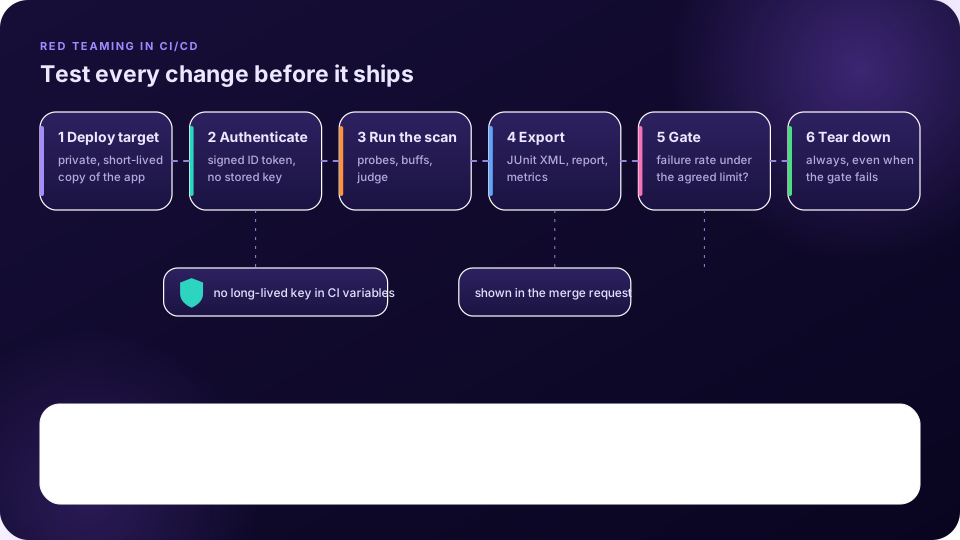
Red teaming at release time finds problems late. A model, a prompt, a guardrail or a tool can all change between releases, and each change can reopen a hole. The Microsoft team’s lessons say that securing AI systems is a process that is never complete [1]. A pipeline stage that repeats your attack suite on every relevant change turns that into routine work. promptfoo’s documentation says organisations can build red teaming into the development cycle and processes like CI/CD for continuous monitoring and regression detection [2].
What to run, and when
| Trigger | Suite | Why |
|---|---|---|
| Every merge request touching prompts, model settings, guardrails or tools | A small, fast set: injection, leakage and your regression cases | Fast feedback on the change that caused the failure |
| Nightly or weekly | The full suite with buffs, multi-turn and attacker-model probes | Broad coverage without slowing developers |
| Before a release and after a model upgrade | Full suite plus fresh manual testing | New model, new behaviour: the old results no longer apply |
Authenticate without a stored secret
The scan must reach your application and usually a model API. The weakest way to do this is a long-lived key stored in a CI variable, which anyone who can read the variable can reuse. GitLab’s alternative is the ID token: “JSON web tokens (JWT) generated by GitLab CI/CD” that jobs can use for OIDC authentication with third-party services. Services can be configured to reject tokens whose audience claim does not match their bound audience, which limits where a token can be used [3]. In practice you configure the cloud or gateway side to trust your project’s tokens and exchange them for short-lived credentials, so nothing long-lived sits in the pipeline settings. Other CI systems have equivalents.
Test a private, disposable copy
- Deploy a short-lived copy of the application that only the pipeline can reach, so a scan never touches production or a public endpoint.
- Use planted canary data, not real records.
- Always tear the target down, including when the gate fails.
- Treat reports as sensitive: they contain attack prompts and model outputs. Set an expiry on artifacts and restrict who can download them.
Publish results where people look
GitLab can show JUnit XML test reports in the merge request’s test summary and in the pipeline’s Tests tab, comparing results between the source and target branches [4]. promptfoo can export JUnit XML, JSON and HTML, and Augustus writes JSON, JSONL and HTML, so a scan can feed that view and also keep the full report as an artifact [2] [5]. For trends over time, MLflow, an open-source tracking tool, offers an API and UI for logging parameters, code versions, metrics and output files and visualising them later [6]. Log the tool versions, probes, buffs, judge and model as parameters, and the failure rates and attempt counts as metrics, so runs are comparable.
An illustrative GitLab job showing only the two features described above. The script is a placeholder for your own scan command; check each tool’s README for its real options.
red-team-scan:
  stage: test
  id_tokens:
    SCAN_ID_TOKEN:
      aud: https://llm-gateway.example.internal
  script:
    - ./ci/run_scan.sh          # your scan; writes reports/junit.xml
  artifacts:
    when: always
    expire_in: 7 days
    paths:
      - reports/
    reports:
      junit: reports/junit.xml
Gate without flakiness
Outputs vary, so a gate on a single number can fail a good change or pass a bad one. promptfoo’s documentation shows two patterns: failing on any test failure, and computing a threshold from the JSON output and exiting with a failing code when it is missed [7]. Choose with care:
- Block on regressions. Fail when a previously passing critical case fails, or when the failure rate is meaningfully worse than the baseline, not when a noisy number moves by a hair.
- Use intervals. If the whole interval is above your limit, fail. If it straddles the limit, rerun with more attempts.
- Separate critical from advisory probes. Leaking a planted secret may block a merge; a borderline tone issue may only warn.
- Keep a way to record a reviewed exception, with an owner and an expiry.
Головне
- Run a small suite on relevant merge requests and the full suite on a schedule and before releases.
- Use short-lived, audience-scoped identity such as GitLab ID tokens instead of long-lived keys in CI variables.
- Scan a private, disposable target with planted data, and always tear it down.
- Publish JUnit results in the merge request, keep full reports as protected artifacts, and track trends in a tool such as MLflow.
- Gate on regressions and intervals, not on one noisy number.
Перевірте себе
1. Why prefer an ID token to a stored API key in CI?
- Services can verify and scope the token, so nothing long-lived is stored — Правильно.
- Tokens are faster
- Keys are illegal
- Tokens need no configuration
The token is issued per job and can be restricted by its audience claim.
2. What should happen to the target after the scan?
- It is torn down, even when the gate fails — Правильно.
- It stays up
- It is made public
- It is ignored
A disposable target avoids leaving test systems running.
3. Why can a single-number gate be flaky?
- Model outputs vary between runs — Правильно.
- CI cannot read numbers
- Reports are encrypted
- Gates are slow
A noisy number can fail a good change or pass a bad one.
4. Where do JUnit reports appear in GitLab?
- The merge request test summary and the pipeline Tests tab — Правильно.
- The wiki
- The issue board
- The runner list
GitLab compares results between the source and target branches there.
Застосуйте на практиці з FireAI
Застосуйте цей урок на своєму Mac.
Джерела
- Bullwinkel et al. (2025), Lessons From Red Teaming 100 Generative AI Products, arXiv:2501.07238
- promptfoo documentation: LLM red teaming
- GitLab documentation: ID token authentication
- GitLab documentation: Unit test reports
- Praetorian Augustus (GitHub README)
- MLflow documentation: Tracking
- promptfoo documentation: CI/CD integration
Застосуйте це на своєму Mac
Усі функції безкоштовно на 17 днів, без банківської картки.