Ders 2 / 8 · 8 dk
macOS Network Extensions: how a modern Mac firewall sees every connection
Mac firewalls no longer need kernel extensions. Learn how Apple’s Network Extension content filters work, why they are safer, what the user must approve, and how FireAI uses them.
Bu sayfa şimdilik İngilizce.
To judge a connection, a firewall has to be asked about it before it happens. On older versions of macOS, that meant a kernel extension: code loaded into the heart of the operating system. Kernel code runs with the highest privileges, and a bug in it can crash the whole machine, the dreaded kernel panic, or open a hole attackers can use. Apple has spent several years moving that work out of the kernel.
From kernel extensions to system extensions
Since macOS Catalina, Apple provides system extensions: components that run in user space, as separate processes, but with the specific entitlements they need. Apple’s developer documentation describes kernel extensions as deprecated for the jobs system extensions now cover, and Apple’s deployment guide explains how both are approved. A system extension that misbehaves can be stopped and restarted without taking the Mac down with it.
Networking is one of those jobs. The Network Extension framework offers several provider types, each for a different purpose. Two are easy to confuse:
NEFilterDataProvider, a content filter: macOS asks it about each new network flow, and it answers allow, drop, or pause while it decides. This is the natural building block for a firewall.NEAppProxyProvider, an app proxy: it receives an app’s traffic and forwards it itself, like a per-app VPN. It is built for tunnelling traffic, not for judging it.
What the user has to approve
A content filter sees every app’s connections, so macOS does not install one silently. The app must be signed with the right Apple entitlement, and the user approves the system extension once in System Settings. Organisations can pre-approve it through device management. This friction is deliberate: anything with this much visibility should be visible to the person who owns the Mac.
How FireAI uses the content filter
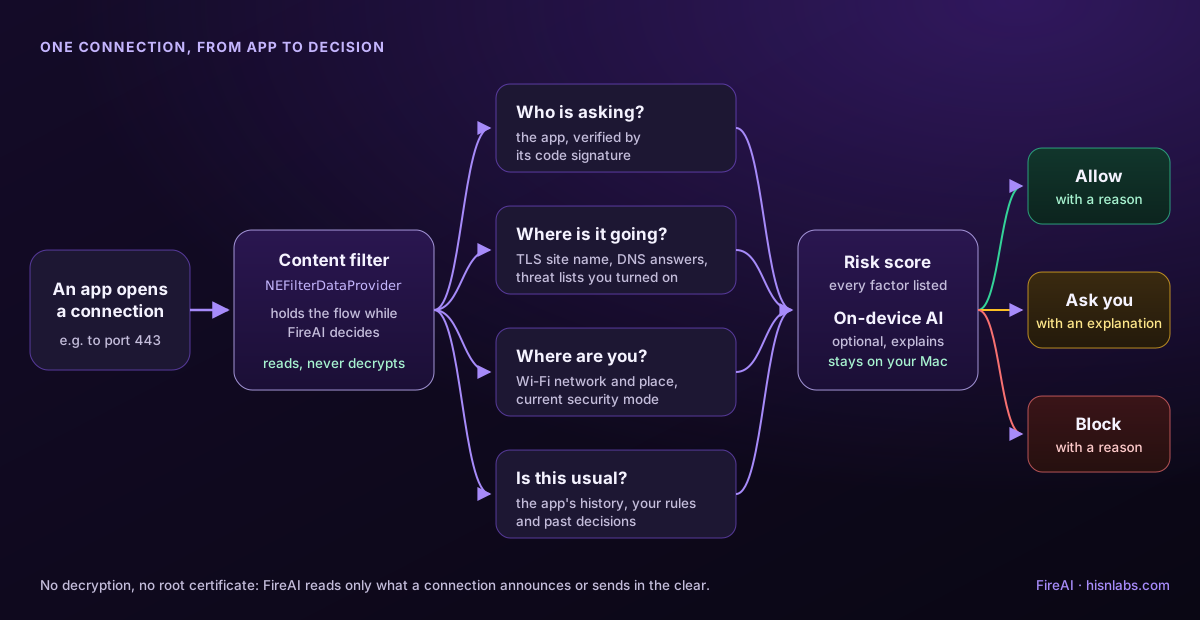
FireAI registers a system extension built on NEFilterDataProvider. When an app opens a connection, macOS asks FireAI first, with the app’s identity, the remote host or address, the port and the protocol. FireAI identifies the app by its code signature, applies your rules, and answers. If it needs to ask you, it pauses the flow until you decide; Apple’s framework lets a TCP flow wait, while UDP flows have a short deadline, so FireAI falls back to your default for those and still shows the question.
Many browsers and Electron apps resolve names themselves and connect straight to an IP address. FireAI reads the DNS answers that pass through the filter to attach the real host name to those connections, so a rule for a domain still matches.
Limits worth knowing
- A content filter judges flows; it does not decrypt them. Lesson 5 covers what can still be learned from an encrypted connection.
- It only works while the extension is running and approved. Removing the approval removes the protection.
- Incoming connections are enforced too, but FireAI does not prompt for them, and it does not list which apps are listening.
Check it on your own Mac
You can see which system extensions are installed with the read-only Terminal command systemextensionsctl list, which shows each extension, its developer team and whether it is activated and enabled. Recent versions of macOS also list network extensions and active content filters in System Settings, under General › Login Items & Extensions and in the Network settings. If a security product claims to filter your traffic, it should appear there. If you ever remove its approval, you have removed the protection, whatever its window still says.
It is also a useful habit when you evaluate any network tool: ask which extension type it uses. A content filter judges flows it does not own; a proxy or VPN extension owns and relays them. Both are legitimate, but they carry different responsibilities, and the answer tells you what the tool can and cannot see.
Akılda kalsın
- Modern Mac firewalls run as system extensions in user space, not as kernel extensions.
- NEFilterDataProvider is Apple’s content-filter API: it allows, drops or pauses each new flow.
- NEAppProxyProvider is for tunnelling an app’s traffic, not for judging it.
- The user approves a content filter once; organisations can pre-approve it with device management.
- FireAI is built on NEFilterDataProvider and fails open if its rules can’t load.
Kendinizi sınayın
1. Why did Apple move network filtering out of kernel extensions?
- Kernel extensions are slower to download
- Code in the kernel runs with the highest privileges, and a bug can crash or compromise the whole system — Doğru.
- System extensions can’t be removed
- Kernel extensions only work on Intel Macs
User-space system extensions isolate faults: a crash stops one process instead of causing a kernel panic.
2. Which Network Extension provider type is designed to judge each connection with allow, drop or pause?
- NEAppProxyProvider
- NEPacketTunnelProvider
- NEFilterDataProvider — Doğru.
- NEDNSProxyProvider
NEFilterDataProvider is the content filter; the proxy and tunnel providers forward traffic instead of judging it.
3. What does FireAI do if its filter can’t load your rules?
- Blocks every connection
- Lets traffic through and shows an alert — Doğru.
- Deletes your rules
- Restarts the Mac
It fails open with an alert so a broken rule file never cuts you off; blocking everything is left to the kill switch you control.
FireAI ile uygulayın
Bu dersi kendi Mac’inizde uygulamaya koyun.
- FireAI Mac’inizin bağlantılarını nasıl izler — Gizli bir arka plan hizmeti olarak çalışan hiçbir şey kurmadan, hangi uygulamanın internetle konuştuğunu sade bir dille bilin.
- Kurallar: uygulama, web sitesi, alan adı, IP veya bir aralık; sonsuza dek ya da yeniden başlatana kadar — Tek bir adres kadar kesin, ya da koca bir alan adı kadar geniş bir kural yazın.
- Otomatik Pilot: kolay bağlantılara FireAI sizin adınıza karar verir — Kolay kararları FireAI’ın kendi başına vermesine izin verin, ve nedenini her zaman görün.
- Hiçbir şeyin şifresini çözmeden derin inceleme — FireAI hiçbir zaman içini okumadan, güvenli bir bağlantı hakkında gerçek ayrıntılar edinin.
- Güvenlik modları: Ev, Kafe, Çok temkinli, Saldırı altında — FireAI’ın sıkılığını, Mac’inizin gerçekte bulunduğu yere tek dokunuşla uydurun.
- Coffee Shop Armor: safer on public Wi-Fi, and warned about fake networks — Sit down in any café, hotel or airport and let FireAI tighten up for you.
- Dünya haritası — Kendinizin arayacağı bir ana bilgisayar adı değil, verilerinizin gerçekten nereye gittiğini görün.
- FireAI’a Sor: formlar yerine sade dille emirler — Menülerde dolaşmak yerine bir cümle yazarak FireAI’ın ne yaptığını değiştirin.
- Bir bağlantıyı inceleyin — Belirsiz bir uyarı yerine, önünüzdeki gerçeklerle karar verin.
Kaynaklar
- Apple Developer: NEFilterDataProvider
- Apple Developer: Content filter providers
- Apple Developer: NEFilterNewFlowVerdict
- Apple Developer: NEAppProxyProvider
- Apple Developer: System Extensions
- Apple Developer: Kernel extensions
- Apple Platform Deployment: System and kernel extensions in macOS
- FireAI docs: How the network filter works
Mac’inizde uygulayın
Tüm özellikleri 17 gün ücretsiz deneyin, kart gerekmez.