Урок 3 из 4 · 8 мин
Patch management: from “update available” to verified fix
Updates close the holes attackers use most. Learn the patch lifecycle, identify, test, deploy and verify, how to handle systems you cannot patch, and how to keep a Mac current without drama.
Пока эта страница на английском.
Every software update that says “security fixes” closes a door that someone has found open. Once a vulnerability is published, attackers study the fix to understand the flaw, and systems that stay unpatched become easy targets. CISA’s catalog of Known Exploited Vulnerabilities exists precisely because so many real attacks use flaws for which a patch was already available. Patch management is the routine that keeps that window as short as possible.
NIST’s guide to enterprise patch management (SP 800-40 Rev. 4) frames patching as preventive maintenance: an ordinary, planned cost of running technology, like servicing a car, rather than an emergency response. The organisations that patch well are the ones that turned it into a predictable routine.
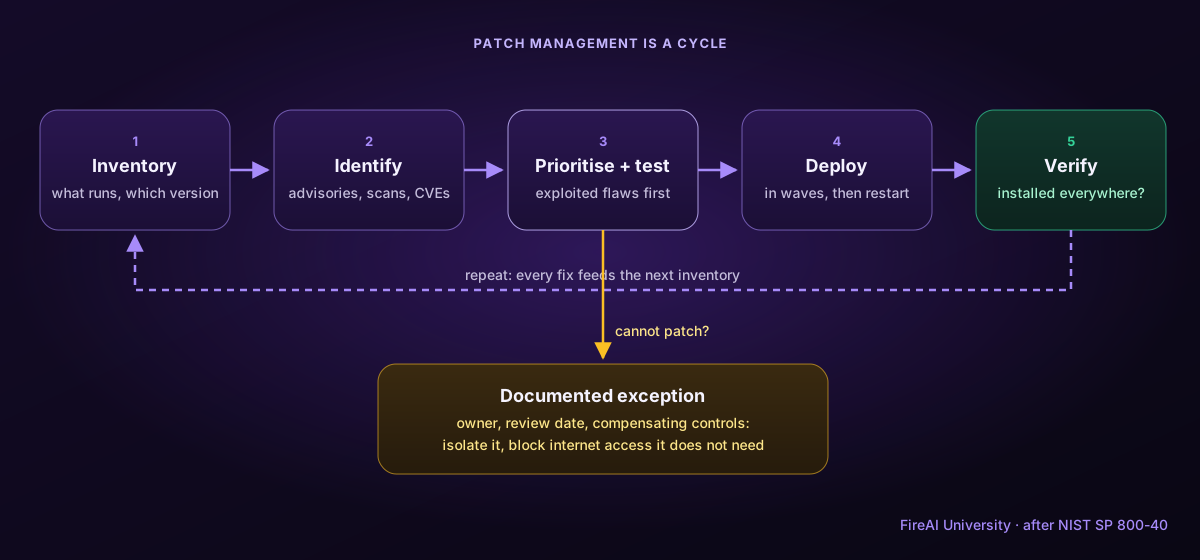
1. Know what you run
The lifecycle starts with an inventory of hardware, operating systems and applications, including versions. Without it, forgotten machines and old apps stay unpatched forever. Vulnerability scans from the previous lesson help reveal what the inventory missed.
2. Identify what needs updating
Follow vendor security announcements (Apple publishes its security releases with the CVEs each update fixes), subscribe to advisories for the software you depend on, and compare your inventory with scan results. For each available update, note which vulnerabilities it closes and whether any are known to be exploited. Do not forget third-party software: browsers, plug-ins, developer tools and chat apps are frequent targets and often update separately from the operating system.
3. Prioritise and test
Not every update is equally urgent. Actively exploited flaws on internet-facing systems come first; many organisations set targets such as days for critical, exploited issues and weeks for the rest. Before a broad rollout, test updates on a small group of representative machines to catch incompatibilities with business software. Testing should be quick; a week of testing is not a reason to leave a known exploited hole open.
4. Deploy
Roll out in waves: the test group, then early adopters, then everyone. Use central tools where possible (device management for company Macs, automatic updates for personal devices). Schedule restarts sensibly, since many updates are not effective until the machine or app restarts, and communicate clearly so people do not postpone them indefinitely.
5. Verify
A patch is only done when it is confirmed. Re-scan or check versions to make sure the update actually installed everywhere, and investigate failures. Track simple metrics: how many machines are current, and how long critical fixes take from release to full deployment.
When you cannot patch: exceptions
Sometimes a system cannot be updated: a medical device approved only on an old version, a machine running software that breaks after upgrading, or a product the vendor no longer supports. These exceptions should be documented, approved by someone accountable, reviewed on a date, and protected with compensating controls:
- Isolate the system on its own network segment and block everything it does not strictly need.
- Remove internet access if the system does not need it.
- Disable the vulnerable feature or service if possible.
- Monitor it more closely, and plan its replacement.
On a Mac, a per-app firewall is a practical compensating control: an app you cannot update yet can be restricted to the servers it really needs, or blocked from the internet entirely, until the fix arrives.
Keeping a Mac current
- Turn on automatic updates for macOS, including security responses and system files (System Settings › General › Software Update).
- Update apps from the App Store automatically, and check apps from other sources through their own update menus.
- Restart when asked: many fixes only apply after a restart.
- Remove apps you no longer use; they are one less thing to patch.
- Use a tool that tells you which apps are behind. FireAI’s “apps that need an update” list does this for well-known apps it has seen connecting.
Главное
- Most real attacks exploit flaws that already have a patch: speed matters.
- The lifecycle is inventory, identify, prioritise and test, deploy, verify, and repeat.
- Prioritise exploited, internet-facing flaws; keep testing short.
- A patch is only done once it is verified everywhere.
- Systems that cannot be patched need documented exceptions and compensating controls such as isolation.
Проверьте себя
1. Why do attackers move quickly after a security update is published?
- Updates slow computers down
- They study the fix to understand the flaw and target systems that have not installed it yet — Верно.
- Updates remove antivirus
- Published patches contain passwords
A published fix reveals where the weakness was. Unpatched systems become easy targets, so the window after release matters.
2. What is the last step before a patch can be considered done?
- Announcing it to users
- Verifying it actually installed everywhere — Верно.
- Deleting the old version
- Buying a new licence
Deployments fail silently on some machines. Only verification confirms the vulnerability is closed.
3. A lab machine cannot be updated because its software would break. Which is a sound response?
- Ignore it; it is only one machine
- Document an exception and isolate it, removing internet access it does not need — Верно.
- Disable all logging on it
- Share its password so the vendor can help
Unpatchable systems need approved exceptions and compensating controls like isolation and restricted network access.
Примените на практике в FireAI
Примените этот урок на своём Mac.
- Находите приложения с известными уязвимостями — Закройте известные бреши прежде, чем ими воспользуются: обновите то единственное приложение, которому это нужно.
- Списки угроз (по желанию) — Сверяйте свой трафик с открытыми данными об угрозах, никуда его не отправляя.
- Исследовать подключение — Принимайте решение, опираясь на факты перед глазами, а не на смутное предупреждение.
- Страница «Угрозы»: что выглядит подозрительно и почему — Видьте лишь ту горстку подключений, которая заслуживает внимания, вместо того чтобы листать тысячи.
Источники
- NIST SP 800-40 Rev. 4: Guide to Enterprise Patch Management Planning
- CISA: Known Exploited Vulnerabilities Catalog
- CISA: Understanding patches and software updates
- Apple security releases
Примените это на своём Mac
Все функции бесплатно на 17 дней, без банковской карты.