Урок 4 из 4 · 8 мин
Data at rest, in transit and in use: protecting information in all three states
Data needs different protections when it is stored, when it moves and when it is being processed. Here is what protects each state, and where the gaps are.
Пока эта страница на английском.
Security people describe data by its state: at rest (stored on a disk, a phone or a server), in transit (moving across a network) and in use (loaded in memory while a program works on it). Each state has its own risks and its own protections, and a system is only as strong as the state it protects worst. Encrypting a laptop’s disk does nothing for the same file once you email it; encrypting the email does nothing once the recipient opens it.
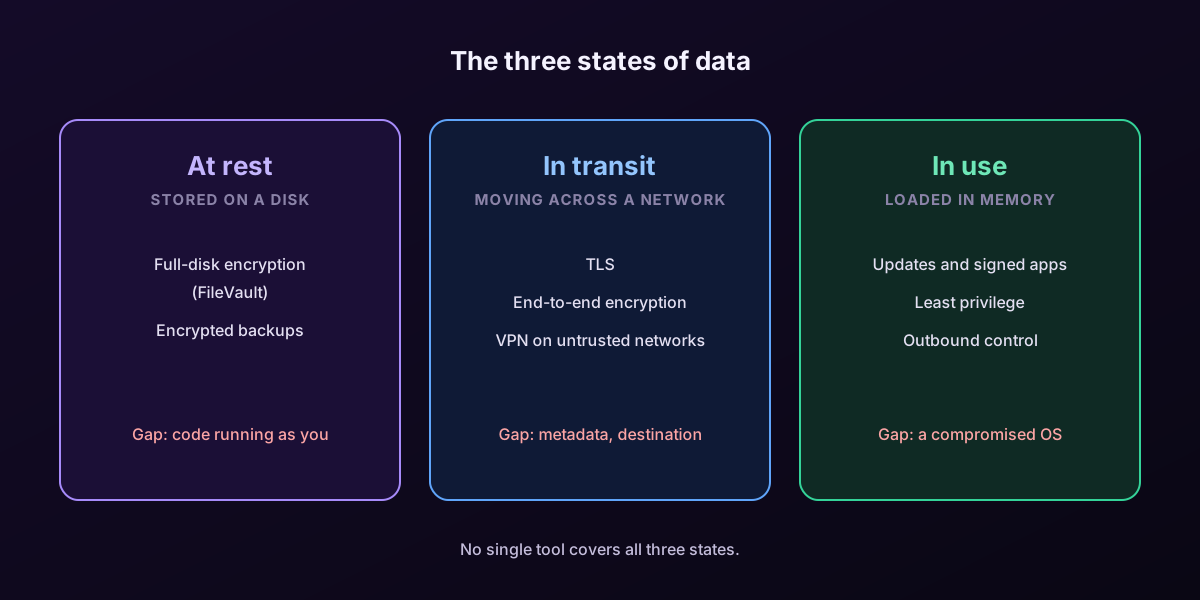
At rest: full-disk encryption and backups
The main threat to stored data is physical: a lost laptop, a stolen phone, a discarded drive. Full-disk encryption answers it. On a Mac, FileVault encrypts the startup volume with AES, and Apple’s Platform Security Guide explains that on Macs with Apple silicon the encryption keys are protected by the Secure Enclave, so the disk cannot simply be read in another machine. NIST’s guide to storage encryption, SP 800-111, makes the same point in general terms: encryption at rest is only as good as the protection of its key, which is why the key is tied to your login password and hardware.
- Turn on FileVault (System Settings › Privacy & Security) and keep the recovery key somewhere safe and offline.
- Encrypt backups too. An unencrypted backup drive undoes the protection of an encrypted laptop.
- Remember what at-rest encryption does not do: once you are logged in, the files are readable to you, and to any app or intruder running as you.
In transit: TLS everywhere, and knowing who you send to
Data crossing a network can be read or altered by anyone on the path: the café Wi-Fi, a compromised router, an internet provider. TLS protects web traffic, email between servers and most app connections, as the previous lesson explained. End-to-end encryption goes further, keeping content unreadable even to the service carrying it. Two gaps remain. First, metadata, who talks to whom, when and how much, is often visible even when content is encrypted. Second, encryption in transit says nothing about where the data is going. A perfectly encrypted connection can still carry your contacts to an analytics company you never agreed to.
In use: the hardest state to protect
To work on data, a program must decrypt it into memory. That makes data in use the favorite target of malicious software: an infostealer reads passwords and cookies from memory and files while you are logged in, and full-disk encryption cannot stop it because the disk is already unlocked. Protections here are about limiting who runs code on the machine and what that code can reach: keeping the operating system updated, installing only signed software, granting app permissions sparingly, and watching what leaves the machine.
For servers and cloud workloads, a newer family of techniques called confidential computing uses hardware-based trusted execution environments to keep data encrypted in memory even from the cloud provider’s own administrators. The Confidential Computing Consortium, a Linux Foundation project, coordinates this work. It is powerful but specialized, and it does not replace the basics.
Putting the three together
| State | Main risk | Main protection | What it does not cover |
|---|---|---|---|
| At rest | Lost or stolen device, discarded drive | Full-disk encryption (FileVault), encrypted backups | Anything running while you are logged in |
| In transit | Eavesdropping or tampering on the network | TLS, end-to-end encryption, VPN on untrusted networks | Metadata, and where the data is going |
| In use | Malicious or overreaching software on the device | Updates, signed apps, least privilege, outbound control | A fully compromised operating system |
Главное
- Protect data in all three states: at rest, in transit and in use.
- At rest: FileVault and encrypted backups protect against loss and theft, not against code running as you.
- In transit: TLS and end-to-end encryption protect content, not metadata or the destination.
- In use is the hardest: limit what runs on the machine and control what leaves it.
Проверьте себя
1. Your Mac has FileVault on. Which threat does it NOT protect against?
- A thief reading the disk of a stolen, powered-off laptop
- An infostealer running while you are logged in — Верно.
- Someone removing the drive and reading it elsewhere
- Data exposure when you recycle an old drive
Once you are logged in, the volume is unlocked; code running as you can read your files.
2. An app sends your data over a perfectly encrypted TLS connection. What can still go wrong?
- Nothing, TLS makes the transfer safe
- The destination itself may be one you never agreed to share data with — Верно.
- The data is automatically deleted
- TLS always leaks the content
Encryption in transit protects the content on the path; it says nothing about who receives it.
3. What does confidential computing aim to protect?
- Data at rest on USB drives
- Data in use, kept encrypted in memory inside hardware-protected environments — Верно.
- Passwords typed on keyboards
- Email subject lines
Confidential computing uses trusted execution environments so data stays protected while being processed.
Примените на практике в FireAI
Примените этот урок на своём Mac.
- Глубокая проверка без расшифровки чего-либо — Получайте реальные подробности о защищённом соединении, при этом FireAI никогда не читает то, что внутри него.
- Правила: приложение, сайт, домен, IP или диапазон, навсегда или до перезагрузки — Напишите правило, точное как один адрес, или широкое как целый домен.
- Карта мира — Видьте, куда на самом деле уходят ваши данные, а не просто имя хоста, которое пришлось бы искать самостоятельно.
Источники
- Apple Platform Security: Volume encryption with FileVault
- NIST SP 800-111: Guide to Storage Encryption Technologies for End User Devices
- NIST SP 800-52 Rev. 2: Guidelines for TLS Implementations
- Confidential Computing Consortium
Примените это на своём Mac
Все функции бесплатно на 17 дней, без банковской карты.