Lekcja 3 z 4 · 9 min
Incident response: the six phases, from preparation to lessons learned
How organisations handle a security incident step by step, why preparation decides the outcome, and how the six-phase model maps to NIST’s guidance.
Ta strona jest na razie po angielsku.
Sooner or later, every organisation has a security incident: a phished account, a stolen laptop, ransomware on a file server. What separates a bad day from a disaster is rarely the attack itself. It is whether people knew what to do, who was in charge and what to do first. Incident response is the discipline of answering those questions in advance.
Two ways of drawing the same cycle
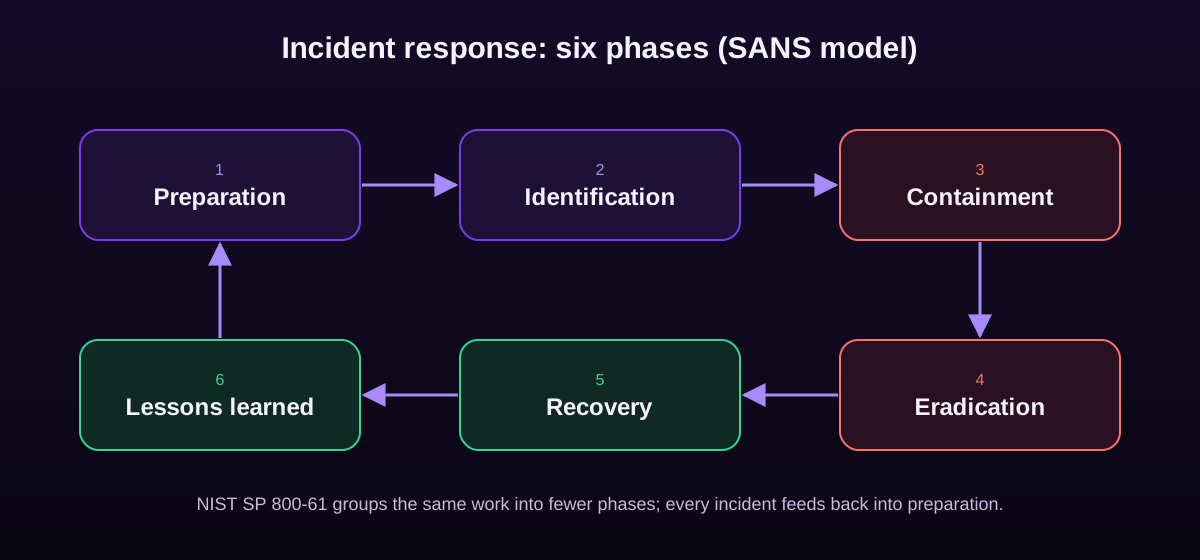
You will meet two common models. The SANS Institute’s incident handler’s handbook describes six phases, often remembered as PICERL: Preparation, Identification, Containment, Eradication, Recovery and Lessons learned. NIST’s Computer Security Incident Handling Guide (SP 800-61 revision 2) groups the same work into four phases: Preparation; Detection and Analysis; Containment, Eradication and Recovery; and Post-Incident Activity. In 2025 NIST published revision 3, which reorganises its recommendations around the six functions of the NIST Cybersecurity Framework 2.0. The steps are the same work; only the grouping differs.
1. Preparation
Preparation is everything you do before the incident: an up-to-date contact list, a written plan with clear roles, logging turned on and kept, backups tested, and playbooks for the incidents you expect most (phishing, ransomware, a lost device). It also means practice: tabletop exercises where the team talks through a scenario and discovers, safely, that nobody knows who can shut down the VPN at 2 a.m.
2. Identification
Something looks wrong: an alert, a user report, a strange bill from a cloud provider. Identification means confirming whether it is a real incident, how serious it is and what is affected. The key discipline here is to write everything down with timestamps from the first minute, because early notes become the timeline everyone relies on later.
3. Containment
Containment stops the damage from spreading while you work out the rest. Short-term containment might mean disconnecting a laptop from the network, disabling a compromised account or blocking an attacker’s address at the firewall. The tension here is real: acting too fast can destroy evidence or tip off the attacker; acting too slowly lets them move further. A good plan says in advance who is allowed to make that call.
4. Eradication
Once the incident is contained, you remove what the attacker left behind: malicious files, persistence mechanisms, rogue accounts, stolen credentials. Eradication is only as good as your understanding of the scope. If you clean one machine but miss the second one the attacker also reached, they come back.
5. Recovery
Recovery brings systems back to normal: restoring from clean backups, rebuilding machines, resetting passwords and watching closely for signs that the attacker is still present. For ransomware, this is where tested, offline backups turn a crisis into an inconvenience.
6. Lessons learned
Within a couple of weeks, the people involved meet to review what happened, without looking for someone to blame. What let the attacker in? What slowed the response? Which detection would have caught it earlier? The output is a short list of concrete changes, and it feeds straight back into preparation. Skipping this phase is the most common way organisations get hit twice by the same thing.
Beyond the technical work
- Legal and regulatory duties: some incidents must be reported to authorities or to affected people within strict deadlines, for example under the GDPR in Europe.
- Communication: one person speaks for the organisation, and staff know not to post about the incident publicly.
- Outside help: know in advance which incident response firm, insurer or national CERT you will call.
Najważniejsze
- Six phases: Preparation, Identification, Containment, Eradication, Recovery, Lessons learned.
- NIST SP 800-61r2 groups the same work into four phases; revision 3 (2025) aligns with NIST CSF 2.0.
- Preparation and practice decide the outcome more than any tool.
- Containment balances speed against preserving evidence; decide in advance who makes that call.
- Lessons learned feed the next preparation cycle; skipping it invites a repeat.
Sprawdź się
1. Which phase comes right after identifying a real incident?
- Lessons learned
- Containment — Dobrze.
- Recovery
- Preparation
Once an incident is confirmed, the priority is to stop it spreading.
2. Why is the lessons-learned phase so important?
- It is where the attacker is punished
- It turns the incident into concrete improvements that feed the next preparation cycle — Dobrze.
- It is only needed for insurance
- It replaces the need for backups
Without it, the same weakness is likely to be exploited again.
3. What is a tabletop exercise?
- A real attack against your own network
- A discussion-based rehearsal where the team talks through an incident scenario — Dobrze.
- A type of backup
- A furniture inventory
Tabletop exercises reveal gaps in plans and roles safely, before a real incident.
Wypróbuj to z FireAI
Zastosuj tę lekcję w praktyce na swoim Macu.
- Aktywność: każda aplikacja, która się łączyła, i wyszukiwanie historii w zwykłych słowach — Zobacz każdą aplikację, która dziś się łączyła, i zareaguj na dowolną z nich jednym kliknięciem.
- Strona Zagrożenia: co wygląda podejrzanie i dlaczego — Zobacz garstkę połączeń wartych twojej uwagi, zamiast przewijać tysiące.
- Zbadaj połączenie — Decyduj mając przed sobą fakty, a nie niejasne ostrzeżenie.
- Wyłącznik awaryjny (kill switch) — Odetnij swojego Maca od internetu jednym kliknięciem, gdy coś wydaje się nie tak.
Źródła
- NIST SP 800-61 Rev. 2: Computer Security Incident Handling Guide
- NIST SP 800-61 Rev. 3: Incident Response Recommendations and Considerations for Cybersecurity Risk Management
- SANS Institute: Incident Handler’s Handbook
- CISA: Federal Government Cybersecurity Incident and Vulnerability Response Playbooks
- NIST Cybersecurity Framework
Zastosuj to na swoim Macu
Wypróbuj wszystkie funkcje za darmo przez 17 dni, bez karty.