Lektion 3 von 4 · 8 Min.
Network defense: IDS, IPS and network segmentation
How intrusion detection and prevention systems spot suspicious traffic, why encryption limits what they see, and how splitting a network into zones stops one breach from becoming a disaster.
Diese Seite gibt es vorerst auf Englisch.
Firewalls decide what may pass. But traffic that is allowed can still be harmful: a permitted web connection might carry an attack, and a trusted laptop might already be compromised. Network defense adds two further ideas. The first is watching traffic for signs of trouble, the job of intrusion detection and prevention systems. The second is designing the network so that when something does go wrong, the damage stays small. That is segmentation.
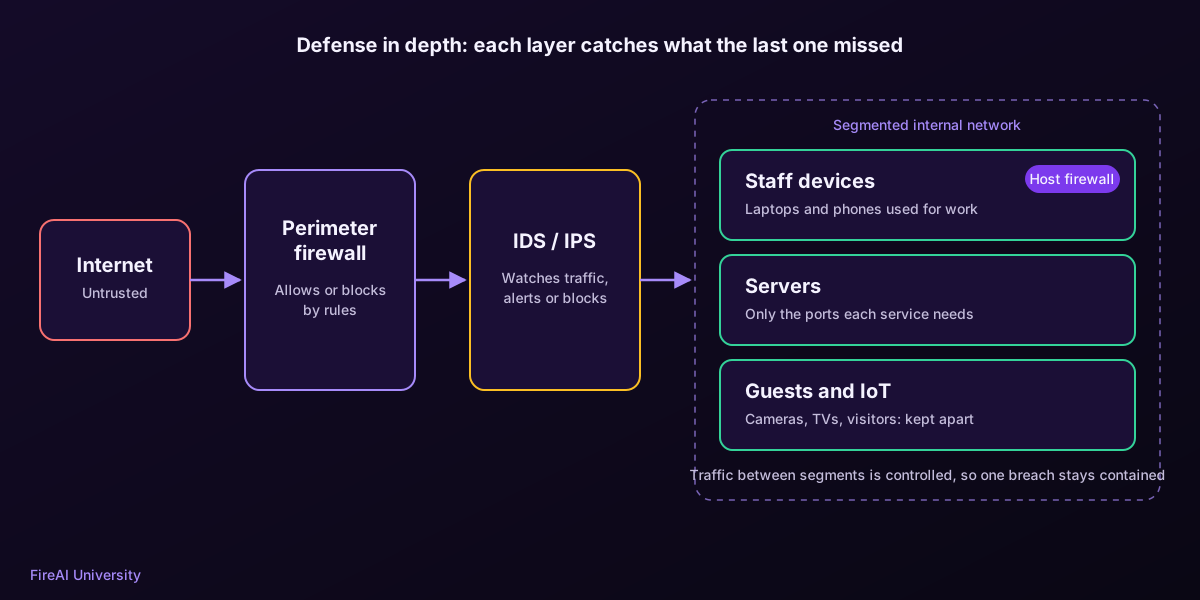
IDS: the alarm system
An intrusion detection system (IDS) monitors network traffic or computer activity and raises an alert when it sees something suspicious. NIST’s guide to intrusion detection and prevention systems, SP 800-94, describes several kinds. A network IDS watches traffic on a network segment, usually from a copy of the traffic so it never slows it down. A host-based IDS watches activity on a single computer. An IDS only reports; a person or another system decides what to do.
How detection works
| Method | How it works | Strength | Weakness |
|---|---|---|---|
| Signature-based | Matches traffic against patterns of known attacks | Precise, few false alarms for known threats | Blind to new or modified attacks |
| Anomaly-based | Learns what “normal” looks like and flags deviations | Can catch never-seen-before behaviour | More false alarms; normal changes over time |
| Stateful protocol analysis | Checks that protocols are used the way their standards describe | Spots misuse of legitimate protocols | Needs detailed protocol knowledge; resource-heavy |
IPS: the alarm that can also lock the door
An intrusion prevention system (IPS) does everything an IDS does, but it sits in the path of the traffic and can act: drop a malicious packet, end a connection or block an address. The trade-off is risk. A false alarm in an IDS produces an unnecessary alert; a false alarm in an IPS blocks legitimate work. Many organisations therefore run new rules in detection-only mode first and switch to prevention once they trust them.
The encryption problem
Most traffic today is encrypted with TLS, which is excellent for privacy but means a network IDS can no longer read the content of web connections. Organisations respond in three ways. Some decrypt traffic at a proxy, which is invasive and breaks some apps. Some rely on metadata: which addresses talk, when, how much data flows, and what the connection announces before encryption starts, such as the server name. And some move detection onto the devices themselves, where traffic can be linked to the program that produced it.
FireAI follows the metadata and on-device approach on a Mac. It never decrypts your traffic. It reads what connections reveal in the clear, such as DNS lookups and the server name in a TLS handshake, and ties each connection to the app that made it. In Alert mode, the first time an app tries to reach a destination with no rule yet, FireAI pauses that connection and asks you, showing the app, the destination and, when it can tell, the country and company behind it, all without looking inside the encrypted content.
Segmentation: limiting the blast radius
In a flat network, every device can talk to every other device. If one is compromised, the attacker can move sideways, a technique called lateral movement, until they reach something valuable. Segmentation divides the network into zones and controls traffic between them. CISA recommends it as a core defense precisely because it contains intrusions: a compromised printer in one segment should not be able to reach the finance servers in another.
- VLANs split one physical network into several logical ones.
- Firewalls or access control lists between segments decide which zones may talk, and on which ports.
- A DMZ holds internet-facing servers, so a breach there does not open the internal network.
- Microsegmentation applies rules down to individual workloads or devices, a key idea in zero trust.
Segmentation at home and in small offices
You do not need an enterprise budget to use these ideas. Most home routers offer a guest network: put visitors, smart TVs, cameras and other IoT devices there, and keep your work computers on the main network. Change default passwords on routers and devices, and keep their firmware updated. On your Mac, a host firewall acts as a segment of one: FireAI’s Who’s online view lists the devices sharing your network, so an unexpected one stands out, and its rules decide what each app on your Mac may reach.
Das Wichtigste
- An IDS detects and alerts; an IPS sits inline and can block, at the cost of blocking legitimate traffic on false alarms.
- Signature detection catches known attacks precisely; anomaly detection can catch new ones but raises more false alarms.
- Encryption hides content from network sensors, pushing detection towards metadata and the devices themselves.
- Segmentation limits lateral movement so one compromised device does not expose the whole network.
Testen Sie sich
1. What is the key difference between an IDS and an IPS?
- An IDS is hardware, an IPS is software
- An IDS alerts; an IPS sits in the traffic path and can block — Richtig.
- An IPS only works on Wi-Fi
- There is no difference
Both detect. Only an IPS is placed inline, so it can drop packets or end connections.
2. Which detection method is most likely to miss a brand-new attack?
- Signature-based — Richtig.
- Anomaly-based
- Manual log review
- Segmentation
Signatures describe known attacks. A new or modified attack has no matching signature yet.
3. What is the main security benefit of network segmentation?
- Faster internet speeds
- It limits lateral movement, so a compromised device cannot reach everything — Richtig.
- It removes the need for passwords
- It encrypts all traffic
By controlling traffic between zones, segmentation contains an intrusion to the segment where it started.
Mit FireAI ausprobieren
Wenden Sie diese Lektion auf Ihrem eigenen Mac an.
- Wie FireAI die Verbindungen Ihres Macs beobachtet — Wissen Sie in klaren Worten, welche App mit dem Internet spricht, ohne etwas zu installieren, das als versteckter Hintergrunddienst läuft.
- Regeln: App, Website, Domain, IP oder ein Bereich, für immer oder bis zum Neustart — Schreiben Sie eine Regel, so präzise wie eine Adresse oder so weit gefasst wie eine ganze Domain.
- Coffee Shop Armor: safer on public Wi-Fi, and warned about fake networks — Sit down in any café, hotel or airport and let FireAI tighten up for you.
- Who’s online: see every device on your network, and get told when one comes or goes — Know what’s on your Wi-Fi, from the TV to your kid’s phone, without any extra box.
Quellen
- NIST SP 800-94: Guide to Intrusion Detection and Prevention Systems (IDPS)
- CISA: Layering network security through segmentation
- NIST SP 800-207: Zero Trust Architecture
- RFC 8446: The Transport Layer Security (TLS) Protocol Version 1.3
Setzen Sie es auf Ihrem Mac um
Teste alle Funktionen 17 Tage kostenlos, ohne Karte.