Lekcja 15 z 18 · 10 min
Comparing guardrails fairly: frozen attacks, benign controls and the same judge
Design a test harness that compares input and output guardrails on equal terms, measures both the attacks that get through and the legitimate requests that are blocked, and reports the uncertainty.
Ta strona jest na razie po angielsku.
Sooner or later someone asks which guardrail to buy or adopt. A fair answer needs an experiment, because a guardrail’s marketing page measures nothing about your application. The design below works for open-source guardrails such as NeMo Guardrails, a toolkit for adding programmable input, dialog, retrieval, execution and output rails [1], and Llama Guard, a model that classifies prompts and responses against a safety taxonomy [2], and it works the same way for any other.
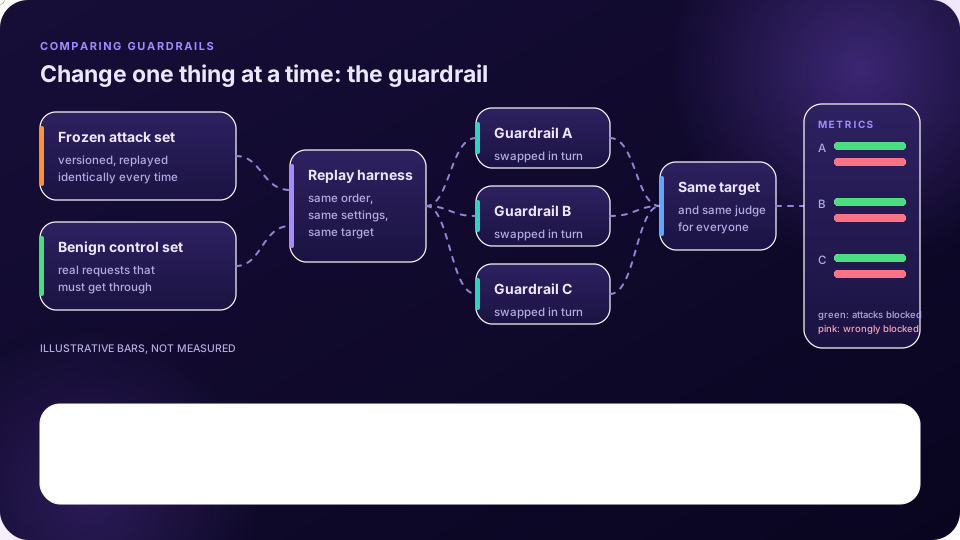
The design
- A frozen attack set. Version a fixed collection of attack prompts and conversations, chosen from the families in lesson 7 and run through the buffs you care about. Do not change it between guardrails or between runs. Freezing is what makes results comparable, and it also means the set will age (see the end of this lesson).
- A benign control set. A guardrail’s job is to stop bad requests and let good ones through. Collect legitimate requests that reflect real use, including awkward ones that look suspicious but are fine, such as security questions from a defender. Without this set, a guardrail that blocks everything would win.
- A replay harness. A small program that sends the same prompts in the same order with the same settings through each guardrail configuration, and records every decision.
- The same target and the same judge for every arm. Only the guardrail changes. If the target or judge differs, you are comparing the wrong thing.
- Both error types per guardrail. Count attacks that got through, and benign requests that were wrongly blocked. Report them side by side.
- Uncertainty. Use intervals (lesson 14). With a small attack set, two guardrails that look different may not be.
Use the same prompts for each arm
Because every guardrail sees the same prompts, the comparison is paired: for each prompt you can ask whether guardrail A and guardrail B agreed. Miller’s paper on error bars for language-model evaluations presents formulas for measuring differences between models and for planning experiments, and pairing is one of the ways it describes reducing noise in such comparisons [3]. Look at the prompts where the guardrails disagree: they teach more than the totals.
Which stage did the work?
A request can be stopped by an input check, by the model’s own refusal or by an output check. Record where each decision happened. A guardrail that blocks only what the model would have refused anyway adds little, and one that blocks at the output stage costs tokens before it acts. The two-stage record also tells you where to add the next layer.
What else to measure
- Latency added per request, and cost if the guardrail calls a model.
- Behaviour on conversations, not only single messages (lesson 6). A guardrail that judges one message at a time can miss a multi-turn drift.
- Behaviour on indirect injection: does it see retrieved content, or only the user’s message?
- Maintenance. Check the project’s licence and recent activity, since an archived project will not get fixes.
Pitfalls
- Tuning on the test set. If you adjust a guardrail while looking at the frozen attacks, the result no longer reflects unseen attacks. Keep a private holdout set that is never used for tuning.
- A stale set. Attackers adapt, so rotate in new techniques on a schedule and keep the old ones as regression tests.
- Public sets in vendor training. Published attack sets can end up in a product’s tuning data. A private holdout guards against flattering results.
- One number. “Blocks most attacks” is not a result. Report each family’s rate with its interval, and the benign blocks beside it.
Najważniejsze
- Compare guardrails with a frozen attack set, a benign control set, a replay harness, and the same target and judge.
- Report attacks that get through and legitimate requests that are blocked, side by side.
- Use the same prompts for every arm so the comparison is paired, and study the disagreements.
- Keep a private holdout, rotate new techniques in, and report intervals.
Sprawdź się
1. Why include a benign control set?
- A guardrail that blocks everything would otherwise look perfect — Dobrze.
- It makes tests longer
- It trains the model
- It replaces the attack set
False blocks are a cost of a guardrail and must be measured.
2. What should stay the same across guardrails?
- The target, the judge, the prompts and the settings — Dobrze.
- Only the prompts
- Nothing
- Only the report
Only the guardrail should change.
3. What is the danger of tuning a guardrail on the frozen attack set?
- Results then overstate performance on unseen attacks — Dobrze.
- It breaks the harness
- It deletes data
- It lowers latency
Keep a private holdout that is never used for tuning.
4. What does using the same prompts make possible?
- A paired comparison and a study of disagreements — Dobrze.
- Faster runs
- Smaller files
- No judge
Paired designs reduce noise and the disagreements show where guardrails differ.
Wypróbuj to z FireAI
Zastosuj tę lekcję w praktyce na swoim Macu.
Źródła
- NVIDIA NeMo Guardrails (GitHub)
- Inan et al. (2023), Llama Guard, arXiv:2312.06674
- Miller (2024), Adding Error Bars to Evals, arXiv:2411.00640
- Mazeika et al. (2024), HarmBench, arXiv:2402.04249
Zastosuj to na swoim Macu
Wypróbuj wszystkie funkcje za darmo przez 17 dni, bez karty.