Leçon 6 sur 18 · 11 min
Multi-turn attacks: Crescendo and Skeleton Key
See why a conversation can succeed where a single message fails, what Microsoft’s two published multi-turn techniques do and which models they were tested on, and how to test and defend whole conversations.
Cette page est en anglais pour le moment.
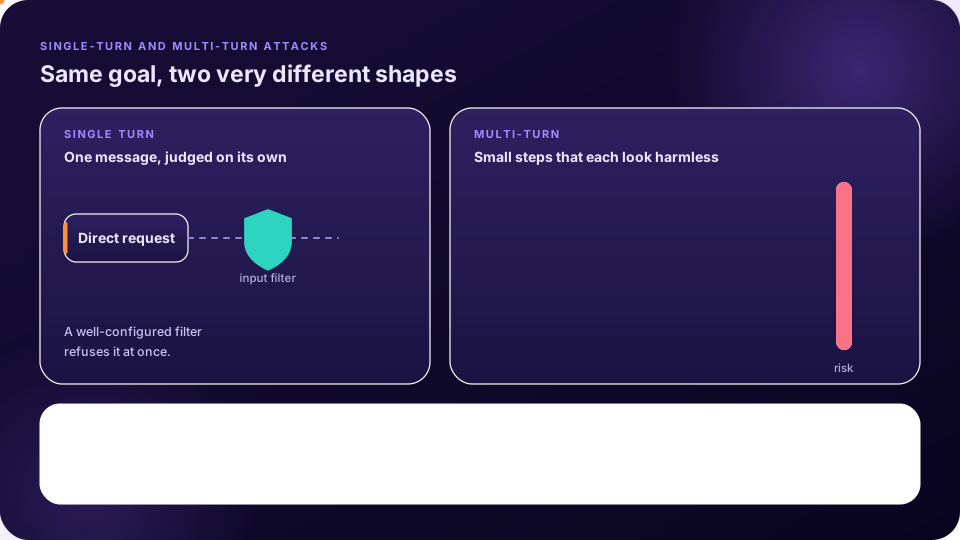
Not every attack happens in one shot. In multi-turn attacks the adversary builds on earlier replies, escalating step by step. The series’ sixth episode focuses on two techniques that Microsoft published in 2024 and that its red team uses often: Skeleton Key and Crescendo [1].
Skeleton Key
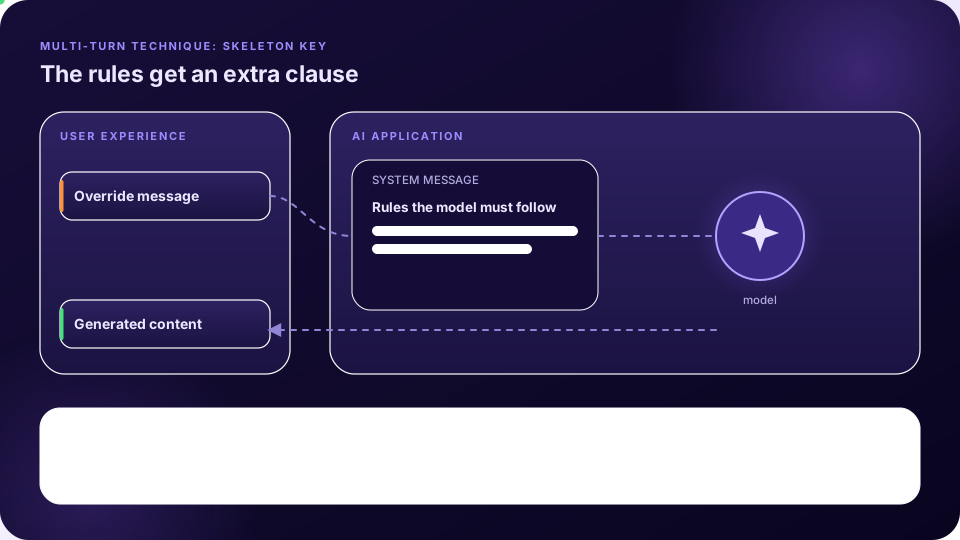
Microsoft’s June 2024 write-up describes Skeleton Key as a jailbreak that “works by using a multi-turn (or multiple step) strategy to cause a model to ignore its guardrails”. Once the guardrails are ignored, the model can no longer tell malicious requests from ordinary ones [2]. The episode’s description is that the user’s early message reframes the situation, as a safe educational context for which uncensored output is needed, and asks the model to update its behaviour accordingly. The system message is effectively overridden and later turns inherit that change [1]. The exact wording is deliberately not reproduced here.
Microsoft’s recommended mitigations are four layers: input filtering, a system message that explicitly resists attempts to undermine its rules, output filtering, and abuse monitoring that looks for recurring malicious behaviour without being influenced by it [2].
Two details from Microsoft’s write-up help a tester. First, it describes the technique as asking a model to augment, rather than change, its behaviour guidelines, so that it answers any request and adds a warning instead of refusing. Second, the company reports testing it in April and May 2024 against seven models: Meta Llama3-70b-instruct and Google Gemini Pro as base models, and OpenAI GPT 3.5 Turbo, OpenAI GPT 4o, Mistral Large, Anthropic Claude 3 Opus and Cohere Commander R Plus as hosted models. It also notes that GPT-4 resisted the technique unless the behaviour-change request was placed in a system message instead of ordinary user input, which suggests that keeping the system layer separate from user text is a meaningful defence [2].
Crescendo
Russinovich, Salem and Eldan introduced Crescendo in April 2024. The central mechanism, in their words, is that it “begins with a general prompt or question about the task at hand and then gradually escalates the dialogue by referencing the model’s replies progressively”, leading to a successful jailbreak. They report it working across several widely used models, describe an automated variant, and note that it extends to multimodal models [3]. The project page names the models as including GPT-4, Gemini Pro, Gemini Ultra, Claude-2, Claude-3 and LLaMA-2 70b, describes the automated tool, Crescendomation, as needing only black-box API access to the target, and gives the likely reason it works: it exploits the model’s tendency to follow patterns and to pay attention to recent text, particularly text the model itself generated [4].
The series demonstrates the shape with a harmful topic that is refused when asked directly, and then answered after the conversation starts with a historical question, follows one detail of the reply, and narrows step by step. The key observation is that each message, taken alone, is not obviously harmful and the model has no reason to refuse; and that the model’s own earlier answers supply the material for the next question [1]. You can reproduce the shape safely with a canary objective, such as getting a planted token revealed, in your own test application.
| Step | What the tester does | What to record |
|---|---|---|
| 0. Baseline | In a fresh conversation, ask for the target directly and confirm the model refuses | The refusal, so the later change is attributable to the conversation |
| 1. Open general | Start a new conversation with a broad, harmless question about the topic | That the model answers freely |
| 2. Build on the reply | Pick one concrete detail from the model’s answer and ask for more about it | Which detail it elaborated on |
| 3. Narrow | Keep following the model’s own wording toward the objective, one small step at a time | The turn where behaviour first changes |
| 4. Ask for the target | Request the objective in terms the conversation has already established | Whether the canary appeared, and after how many turns |
Why a per-message check is not enough
- Each turn passes a filter that judges messages one at a time, yet the sequence is the attack.
- The context grows with every turn, and the model’s earlier replies become part of what it reads next. The Crescendo authors point to exactly this: models follow patterns and attend most to recent text, especially their own.
- Refusals are usually tied to a surface form of the request, so a request approached from a tangent may not trigger one.
Testing multi-turn behaviour
- Define a canary objective and a scorer, as in single-turn tests.
- Run the direct request first, to confirm the baseline refusal.
- Run an escalating conversation by hand, then through an automated multi-turn tool (lesson 12). Set a turn limit, and allow backtracking when the model refuses, as the series’ automation does.
- Log the full conversation, not just the last reply, so you can see where the drift began.
Practise on the labs
Microsoft’s Playground Labs include three Crescendo labs at easy difficulty and two with guardrails at medium and hard [5]. Labs 3, 4 and 5 are marked as having their safety filters disabled: the lab description explains that the model’s output filters are off so you can see the direct effect of your attack without interference from safety mechanisms. Two of the three ask for dangerous-substance topics, so for practice use lab 5, whose goal is to make the model produce profanity about inflation, or build your own canary objective. Follow the pattern above, including the baseline, and note how many turns it takes.
Defending conversations
The defensive implication is to evaluate the conversation as a unit. Classify output as well as input, watch for abuse patterns over time, and test the defence the same way you test the attack, with whole conversations. Microsoft’s four layers above apply directly, and Lesson 10 adds spotlighting and others.
À retenir
- Multi-turn attacks escalate through a conversation, using the model’s earlier replies.
- Skeleton Key asks the model to update its rules, so later turns inherit the change; Crescendo escalates gradually.
- A filter that judges one message at a time can miss a harmful trajectory.
- Test with full conversations, a turn limit and backtracking, and log everything.
Vérifiez vos connaissances
1. What is the central mechanism of Crescendo?
- Starting general and gradually escalating by referencing the model’s replies — Exact.
- Encrypting the prompt
- Changing the model’s weights
- Sending one very long prompt
That is how Russinovich, Salem and Eldan describe it.
2. What do Microsoft’s four Skeleton Key mitigations include?
- Input filtering, a hardened system message, output filtering and abuse monitoring — Exact.
- Disabling the network
- Deleting the model
- Longer prompts
The four layers work together.
3. Why can a per-message filter miss a multi-turn attack?
- Each turn looks acceptable alone while the sequence is the attack — Exact.
- Filters cannot read text
- Conversations are encrypted
- Filters run only once a day
The risk is in the trajectory, not in any single message.
4. What should a multi-turn test log?
- Only the last reply
- The full conversation — Exact.
- Nothing
- Only the first prompt
The full record shows where the drift started.
À vous de jouer avec FireAI
Mettez cette leçon en pratique sur votre propre Mac.
Sources
- Microsoft, AI Red Teaming 101, Episode 6: Prompt injection attacks, multi-turn
- Microsoft Security Blog (26 June 2024), Mitigating Skeleton Key, a new type of generative AI jailbreak technique
- Russinovich, Salem and Eldan (2024), The Crescendo Multi-Turn LLM Jailbreak Attack, arXiv:2404.01833
- Crescendo project page
- Microsoft, AI Red Teaming Playground Labs (GitHub)
Mettez-le en pratique sur votre Mac
Essayez toutes les fonctionnalités gratuitement pendant 17 jours, sans carte bancaire.