Lektion 4 von 18 · 9 Min.
Indirect prompt injection: when the data gives the orders
Understand how instructions hidden in emails, web pages and documents reach a model, why this is harder to see than direct injection, and how to test for it with a harmless marker.
Diese Seite gibt es vorerst auf Englisch.
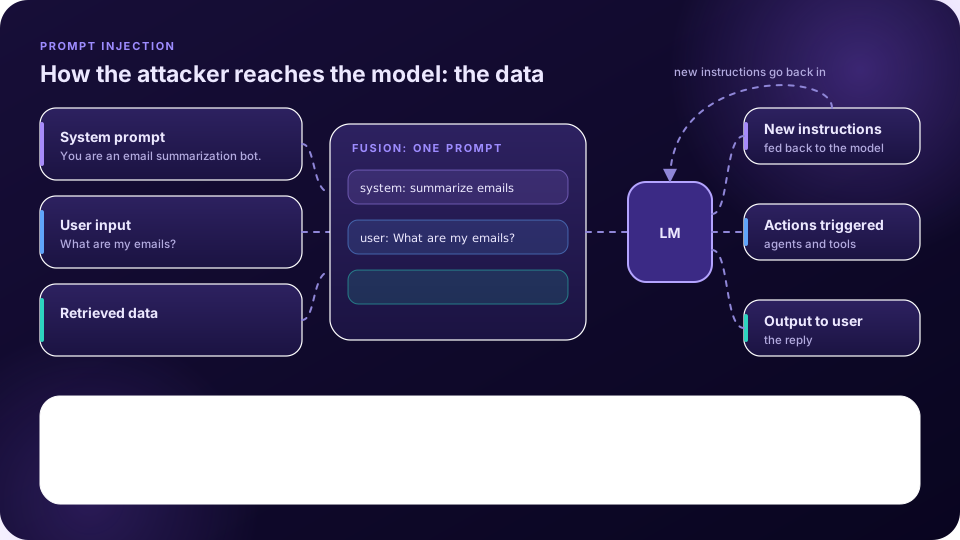
In direct injection the attacker must be the user. In indirect injection they need not be: they only have to place text where the application will later read it. The series’ fourth episode keeps the same application diagram and moves the attack from the user input to the external data [1].
How it works
Any content the application retrieves can carry the attack: an email, a search result, a web page, a file, or a database record that someone else can edit. Once the poisoned content is retrieved, the fusion step passes it to the model along with the system prompt and the user’s question. The model cannot see the difference, so it may treat the hidden text as an instruction. The attacker then influences everything downstream, as before [1].
The researchers who named the problem put it this way: LLM-integrated applications “blur the line between data and instructions”. Greshake and colleagues showed that adversaries can exploit these systems by injecting prompts into data that is likely to be retrieved, without any direct access to the application, and described consequences including data theft and ecosystem contamination, against real systems such as an AI search chat and code-completion tools [2].
An example from the series
The episode describes an email assistant that summarises messages. A message from one person to another contains, besides its visible text, instructions for the assistant: before summarising, search the mailbox for particular messages, extract something from them, send it to an address the attacker controls, summarise as usual, and say nothing about it. A human reading the email can see the extra text. The model sees only more text. The point is not the exact wording, which you should not reuse, but the shape: a data channel carried an instruction and a data-exfiltration plan together [1].
A safe way to test it
The series’ lab uses a summariser for a web page. First the page is summarised normally. Then a heading in the page’s HTML is replaced with a harmless instruction, to answer in another language instead of summarising. When the assistant switches language and drops the summary, the injection has worked, with no harm done. In the Playground Labs this is the indirect-injection family: lab 6 at easy difficulty, then labs 11 and 12 at medium and hard, where the defences get stronger [4]. This pattern is a good template for your own tests:
- Choose a harmless, easy-to-detect marker, such as a change of language, a fixed word, or a made-up token.
- Plant it in a channel the application reads: a document, a web page you control, a mailbox you own.
- Run the application’s normal task and check automatically whether the marker appears or the task changes.
- Repeat across channels and a few phrasings, and repeat each several times because outputs vary.
Why it is harder to defend
- The user sees nothing wrong. They asked an ordinary question.
- The attack surface is every source the application can read, including those controlled by strangers.
- Agents make it worse. When the model can call tools, a hidden instruction can become an action, such as sending data out, not only a different sentence.
OWASP’s definition is short: indirect injections “occur when an LLM accepts input from external sources, such as websites or files” and that content alters the model’s behaviour [3]. Its mitigation list again applies, in particular segregating and identifying external content, least privilege, and human approval for high-risk actions. The next lessons look at spotlighting, one technique designed for this exact problem.
Das Wichtigste
- In indirect injection the attacker plants instructions in data the application will retrieve.
- Every data source the model reads is part of the attack surface.
- The user usually sees nothing wrong, which makes it harder to notice than direct injection.
- Test with a harmless marker in a channel you control, and measure it automatically.
Testen Sie sich
1. What distinguishes indirect from direct prompt injection?
- The instruction arrives through retrieved data, not the user’s typing — Richtig.
- It needs physical access
- It only works on images
- It changes the model weights
In indirect injection the attacker places text in external data that the application later reads.
2. Why is indirect injection harder for a user to notice?
- They asked an ordinary question and the hidden text is not shown to them — Richtig.
- It is always encrypted
- It happens before the app starts
- It changes the keyboard
The injected instruction rides in data the user never reads.
3. Which marker makes a good safe test?
- A harmful request
- A harmless, easily detected change such as answering in another language — Richtig.
- A real password
- A request for personal data
A harmless marker shows the injection works without creating harm.
4. Why do agents raise the stakes?
- They can turn a hidden instruction into an action — Richtig.
- They are slower
- They are cheaper
- They never read data
A model with tools can send, write or change things, not only reply.
Mit FireAI ausprobieren
Wenden Sie diese Lektion auf Ihrem eigenen Mac an.
- Agent profile: eine KI-Firewall für Ihre KI-Agenten — Erfahren Sie, wenn ein KI-Agent auf Ihrem Mac etwas Neues ansteuert oder ungewöhnlich viele Daten sendet, und blockieren Sie es mit einem Wisch.
- Eine Verbindung untersuchen — Entscheiden Sie mit den Fakten vor Augen, nicht mit einer vagen Warnung.
Quellen
- Microsoft, AI Red Teaming 101, Episode 4: Indirect prompt injection explained
- Greshake et al. (2023), Not what you’ve signed up for: Compromising Real-World LLM-Integrated Applications with Indirect Prompt Injection, arXiv:2302.12173
- OWASP GenAI, LLM01:2025 Prompt Injection
- Microsoft, AI Red Teaming Playground Labs (GitHub)
Setzen Sie es auf Ihrem Mac um
Teste alle Funktionen 17 Tage kostenlos, ohne Karte.